


N5 Net Software Repository
Your one-stop for all your software needs.
Search N5 Net Software Repository:
Search Files
Sponsor:
Browse:
- Audio & Multimedia (1527)
- Business (1697)
- Communications (462)
- Desktop (135)
- Development (555)
- Education (163)
- Games & Entertainment (700)
- Graphic Apps (657)
- Home & Hobby (102)
- Network & Internet (524)
- Security & Privacy (499)
- Servers (65)
- System Utilities (8668)
- Web Development (279)
Areas Of Interest
Authors Area
Are you a software author? Take a look at our Author Resource Center where you will find marketing tools, software specifically created for promoting your software and a ton of other helpful resources.
PDF Unlocker 4.0

(Click to Enlarge)
PDF Unlocker can be used to decrypt protected Adobe Acrobat PDF files, which have "owner" password set, preventing the file from editing (changing), printing, selecting text and graphics (and copying them into the Clipboard), or adding/changing annotations and form fields. Decryption is being done instantly. Decrypted file can be opened in any PDF viewer (e.g. Adobe Acrobat Reader) without any restrictions -- i.e. with edit/copy/print functions enabled. All versions of Adobe Acrobat (including 5.x, which features 128-bit encryption) are supported. PDF Unlocker will decrypt PDF files protected with owner password, it will remove restrictions of PDF files, restrictions usually include the impossibility to print or edit or modify the PDF file. PDF Unlocker can't decrypt PDF files protected with user passwords which you are asked for opening the file. PDF Unlocker can decrypt PDF files encrypted with standard encryption handler only. The documents protected with any other encryption handlers (like FileOpen from Standards Australia Software Services, or SoftLock's Acrobat Security Plug-Ins) cannot be decrypted. PDF Unlocker Features: 1. PDF Unlocker is easy to use; 2. PDF Unlocker supports drag and drop PDF files; 3. PDF Unlocker does NOT need Adobe Acrobat software; 4. PDF Unlocker supports Windows 98, ME, NT, 2000, XP and 2003 Systems; 5. PDF Unlocker supports PDF 1.6 (Acrobat 7.x) files, including 40-bit RC4 decryption, 128-bit RC4 decryption, AES decryption, compressed files and unencrypted metadata; 7. The speed of decryption in PDF Unlocker is very fast; 8. PDF Unlocker supports batch operation on many files from command line; 9. PDF Unlocker supports Adobe Standard 40-bit Encryption, Adobe Advanced 128-bit Encryption and AES Encryption; 10. PDF Unlocker supports batch operation from command line;
Specifications:
Version: 4.0 |
Download
|

Similar Products:
PDFAREA PDF PROTECTION REMOVER 7.2
Business :: Office Suites & Tools
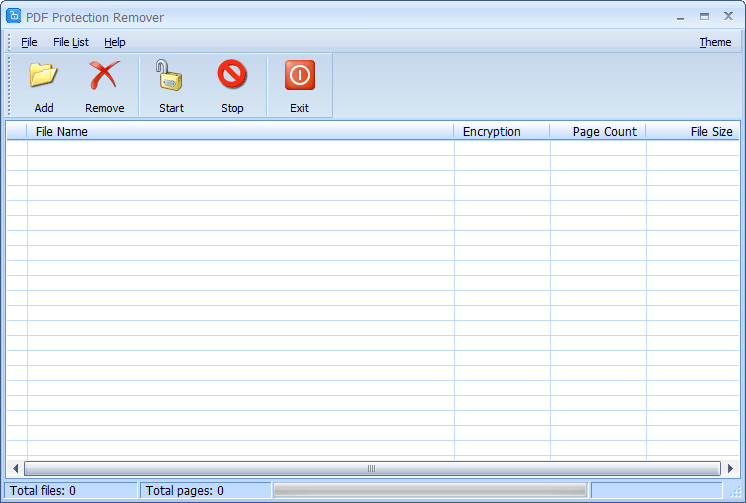 PDF Protection Remover is a quick and easy-to-use PDF utility that is designed to decrypt protected Adobe Acrobat documents (Supports 40-bit RC4, 128-bit RC4, 128-bit AES and 256-bit AES). This software is able to decrypt PDF documents and is able to remove all protections, such as preventing copying, preventing printing, preventing editing, etc. Decrypted PDF file can be opened in any PDF viewer or any PDF editor without any restrictions.
Windows | Shareware
Read More
::
PDF Password Finder can be used to decrypt protected Adobe Acrobat PDF files, which have "owner" password set, preventing the file from editing (changing), printing, selecting text and graphics (and copying them into the Clipboard), or adding/changing annotations and form fields. Decryption is being done instantly. Decrypted file can be opened in any PDF viewer (e.g. Adobe Acrobat Reader) without any restrictions.
Windows | Shareware
Read More
REMOVE PDF FILE PASSWORD PROTECTION 1.0
System Utilities :: File & Disk Management
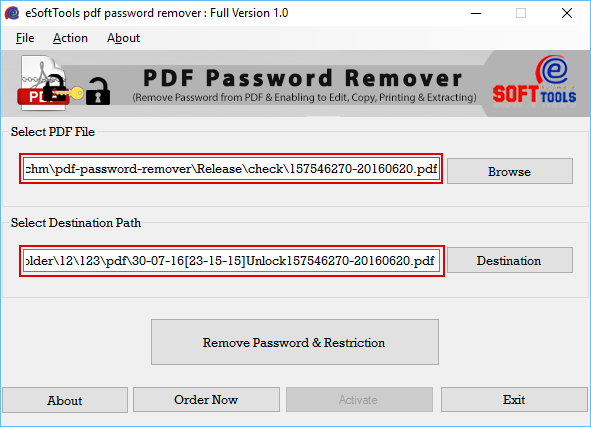 Deprived of any harm you can Remove PDF File Password Protection with best tool of PDF unlocker. PDF password removal is an amazing utility that provides you successful utility for removing PDF file password. With PDF password removal program all consumers can successfully and safely unlock PDF file password with exact data of PDF file.
Windows | Shareware
Read More
PDF PASSWORD RECOVERY COM SDK 4.0
::
PDF Password Recovery COM SDK can be used to decrypt protected Adobe Acrobat PDF files, which have "owner" password set, preventing the file from editing (changing), printing, selecting text and graphics (and copying them into the Clipboard), or adding/changing annotations and form fields. Decryption is being done instantly. Decrypted file can be opened in any PDF viewer (e.g. Adobe Acrobat Reader) without any restrictions.
Windows | Shareware
Read More