


N5 Net Software Repository
Your one-stop for all your software needs.
Search N5 Net Software Repository:
Search Files
Sponsor:
Browse:
- Audio & Multimedia (1527)
- Business (1697)
- Communications (462)
- Desktop (135)
- Development (555)
- Education (163)
- Games & Entertainment (700)
- Graphic Apps (657)
- Home & Hobby (102)
- Network & Internet (524)
- Security & Privacy (499)
- Servers (65)
- System Utilities (8668)
- Web Development (279)
Areas Of Interest
Authors Area
Are you a software author? Take a look at our Author Resource Center where you will find marketing tools, software specifically created for promoting your software and a ton of other helpful resources.
Pavtube HD Video Converter for Mac 4.8.6.6
Audio & Multimedia :: Video Tools
(Click to Enlarge)
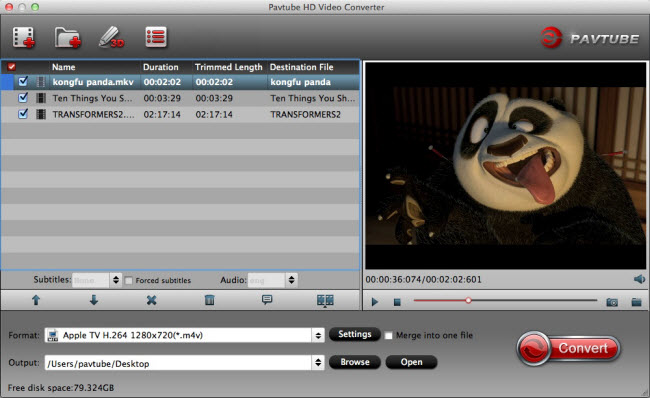
Your Complete HD Video Toolbox - Pavtube HD Video Converter for Mac. Convert, edit, enhance, organize, capture, and watch in over 250 formats on Mac El Capitan, include HD, 4K, 3D, SD, Common videos. Anyone can easily convert all Videos/Audios to any formats like H.265 MP4/MKV, 3D MP4/MKV/MOV/AVI/WMV, HD MKV/MP4/MOV/M4V/WMV/AVI/MPG, M3U8, FLV, ProRes, DNxHD, AIC, MPEG-2, Divx, Xvid, MP3, AC3, AAC, FLAC, WMA, WAV, M4A... The list of compatible devices and formats you can convert to is one of this video converter for Mac's best features. This application allows you to create files specifically tailored for a variety of Non-linear editing systems, tablets, smartphones, gaming systems, VR Headsets, Media Players and more. You can also select Web file types such as FLV, F4V, SWF, then upload them to YouTube, Facebook, Vimeo and Google plus, etc. The best thing about Pavtube is the fact that you find all of its tools in a single screen. You can trim your video before you convert it and adjust aspects such as brightness, contrast, hue and saturation from the same screen. You can also rotate the video from the main interface. Overall, Pavtube HD Video Converter for Mac offers users extraordinary 4K/3D/HD video experience anytime and anywhere. Key features: 1. Innovative HD decoding and encoding technology Not only converting HD videos, converting 4K 3D and general videos are equally impressive. 2. The support for most digital devices All ready-made profiles are optimized for devices, NEL including PS3, Xbox, Apple TV, iPad, iPhone, FCP X, Premiere, etc. 3. High-level customization Change any parameters to improve your video and save your changes for future use 4. Edit Video Deinterlace for better video effect Trim & crop & split Add Text and Image/Video Watermark Insert SRT/ASS/SSA subtitle Audio Editor 5. Audio and video sync technology - allows you to enjoy smooth output videos 6. Handy operation and intuitive profile list
Specifications:
Version: 4.8.6.6 |
Download
|

Similar Products:
DVDFAB_BLU_RAY_RECORDER_COPY_FOR_MAC 12.0.0.3
Audio & Multimedia :: Video Tools
 Decrypt & Copy Recorded BDAV/Blu-ray Discs. Home recorded Blu-ray discs from live broadcastings, aka BDAV discs, are getting popular among Blu-ray lovers as more and more Blu-ray recorders flood into markets. DVDFab Blu-ray Recorder Copy for Mac can remove all the encryptions on this variant of Blu-ray discs, and then make backup copies in multiple ways with flexible settings.
MAC | Shareware
Read More
DVDFAB ALL-IN-ONE FOR MAC 10.2.1.3
Audio & Multimedia :: Video Tools
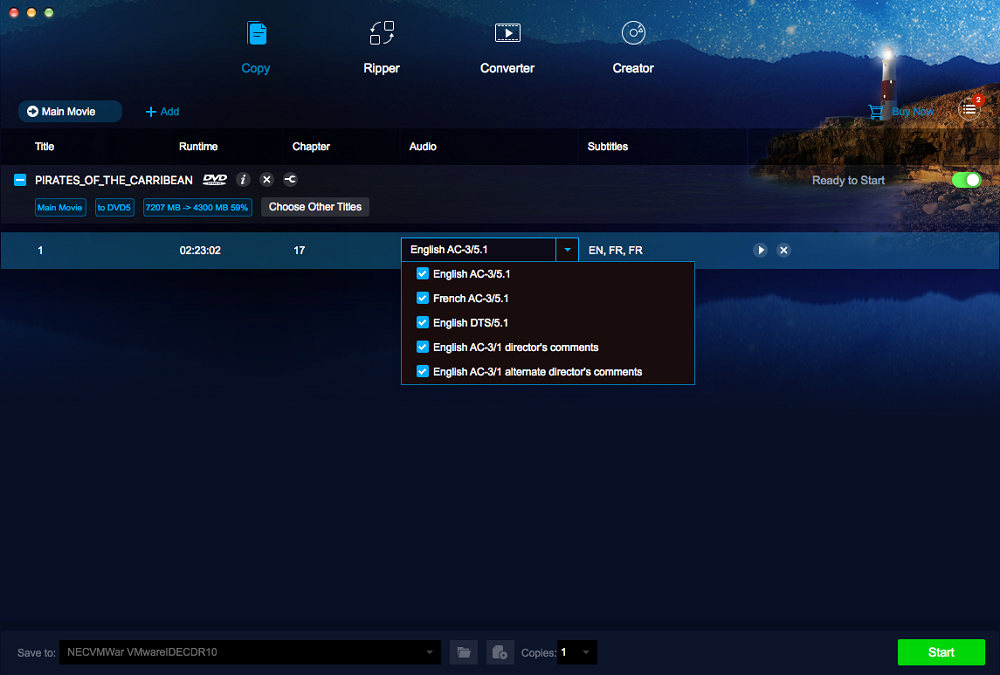 DVDFab All-In-One for Mac includes all DVDFab for Mac options in it. The ultimate solution for your multimedia management needs! You can use it to freely copy, rip, convert, burn, clone any DVD/Blu-ray as desired regarding no limit from any copy protections; you can convert 2D DVD/Blu-ray/video to 3D video; you can convert video among various formats with outstanding audiovisual effect, and simply transfer converted files to iPod, Zune, and PSP.
MAC | Shareware
Read More
DVDFAB DVD CREATOR FOR MAC 10.2.1.3
Audio & Multimedia :: Video Tools
 DVDFab DVD Creator for Mac, the powerful DVD creating tool, has the full capability to convert all sorts of video files into standard studio level DVD discs. The created DVD discs plays on any built-in DVD optical drive that come with any Mac products and standalone DVD players. That's to say, you can freely create your own DVDs out of all kinds of video files you downloaded, from your camcorder, iPod Touch, iPad, whatever!
MAC | Shareware
Read More
STREAMFAB NETFLIX DOWNLOADER 5.0.1.6
Audio & Multimedia :: Video Tools
 StreamFab Netflix Downloader is a streaming video downloader designed for users to download on-demand streaming videos from Netflix to watch without internet connection anywhere.
Windows MAC | Shareware
Read More