


N5 Net Software Repository
Your one-stop for all your software needs.
Search N5 Net Software Repository:
Search Files
Sponsor:
Browse:
- Audio & Multimedia (1527)
- Business (1697)
- Communications (462)
- Desktop (135)
- Development (555)
- Education (163)
- Games & Entertainment (700)
- Graphic Apps (657)
- Home & Hobby (102)
- Network & Internet (524)
- Security & Privacy (499)
- Servers (65)
- System Utilities (8668)
- Web Development (279)
Areas Of Interest
Authors Area
Are you a software author? Take a look at our Author Resource Center where you will find marketing tools, software specifically created for promoting your software and a ton of other helpful resources.
LoopBe30 1.6
(Click to Enlarge)
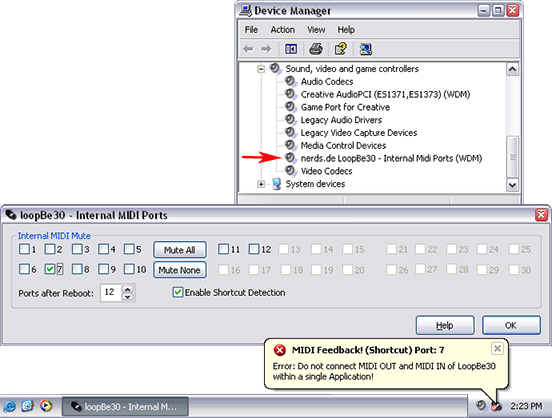
LoopBe30 is a virtual MIDI device driver for transferring MIDI data between computer programs. Basically LoopBe30 provides up to 30 independent 'invisible cables' to connect MIDI outports of applications to any other application's MIDI inport. You may connect up to 8 applications to every single inport and up to 8 application to every single outport, all sending and receiving at the same time. Every port provides the full 16 MIDI channels. LoopBe30 is a native Windows WDM kernel mode driver. Expect the lowest possible latency. Select only the number of ports you need and only that number of ports will be installed on your system and be visible in your audio applications. This will save system resources and usability. This can be done using the system tray application (LoopBe30 Monitor). Additionally you can mute each MIDI port individually. A muted port behaves similarly to an audio device. All data sent to the port is simply discarded, but the sending application will not realize anything. LoopBe30 comes with a powerful shortcut detection. It mutes its ports if the data rate is higher than the MIDI specification of 31.25 kbps. Sometimes it might be necessary or desirable to send more data, for example by sending excessive MIDI polyphonic aftertouch messages. A hardware legacy device would fail here, but not LoopBe30. If you want to send more data than allowed by the spec, and you are sure your setup is shortcut free, simply disable the shortcut detection. This free Evaluation Copy works for 60 minutes after it has been sent its first MIDI data. After every reboot it will work again for a period of 60 minutes.
Specifications:
Version: 1.6 |
Download
|

Similar Products:
Audio & Multimedia :: Other
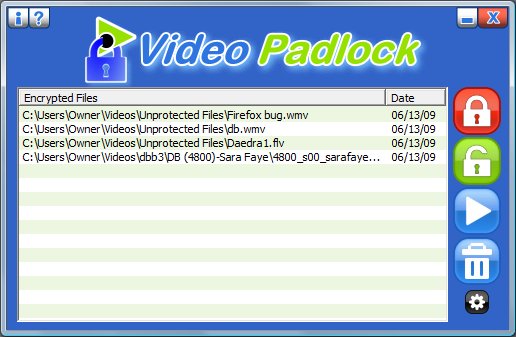 Video Padlock is easy to use encryption software that ensures that your downloaded videos are secure and remain private. Create a master password, choose the files you want to encypt and click a button. The files disappear from view and are only viewable and playable from within Video Padlock after you enter your password. Playback of large files is instant thanks to a unique partial encryption feature. Try the demo and encrypt two files free.
Windows | Demo
Read More
4MEDIA ISO CREATOR 1.0.21.0827
Audio & Multimedia :: Other
 Using 4Media ISO Creator, you can create ISO image files from CD or DVD with the best quality. Also, this smart software supports input formats including CD/DVD data disc or DVD media disc. Besides, with clean and easy-to-handle interface, you can master 4Media ISO Creator fast and easily. As smart software, it also offers convenient operations such as after done action, viewing log file, automatically checking updates, etc.
Windows | Shareware
Read More
Audio & Multimedia :: Other
 Free online radio player with more than 10000 hand-picked radio channels sorted out by country or category. Very easy to install and use. The list of channels is pulled out online from a monitored database that updates on daily basis.
Windows | Freeware
Read More
APEAKSOFT IOS SCREEN RECORDER 1.3.1
Audio & Multimedia :: Other
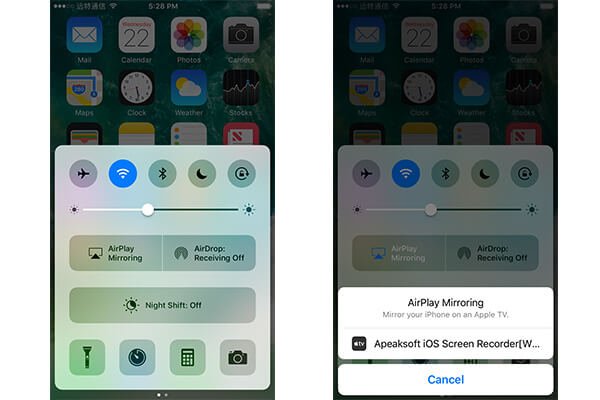 Apeaksoft iOS Screen Recorder works well when you want to record any apps, games on iPhone/iPad/iPod. What you need to do is making your computer and iOS device connect with the same Wi-Fi network. Then you can mirror it to your computer wirelessly without USB cable and you could record the files you want, such as the videos, audio, real-time gameplay.
Windows | Shareware
Read More