


N5 Net Software Repository
Your one-stop for all your software needs.
Search N5 Net Software Repository:
Search Files
Sponsor:
Browse:
- Audio & Multimedia (1527)
- Business (1697)
- Communications (462)
- Desktop (135)
- Development (555)
- Education (163)
- Games & Entertainment (700)
- Graphic Apps (657)
- Home & Hobby (102)
- Network & Internet (524)
- Security & Privacy (499)
- Servers (65)
- System Utilities (8668)
- Web Development (279)
Areas Of Interest
Authors Area
Are you a software author? Take a look at our Author Resource Center where you will find marketing tools, software specifically created for promoting your software and a ton of other helpful resources.
Jihosoft Photo Eraser 1.22
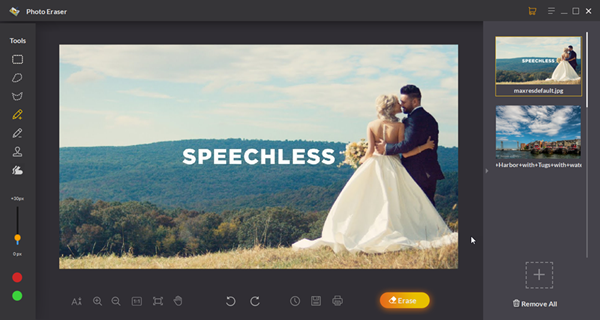
(Click to Enlarge)
Jihosoft Photo Eraser, as its name indicates, is an effective way to remove unwanted objects from your photos. Since many times we are unfortunate in taking a shot with too many distractions which removes our focus from the core object in the photo. Hence, Photo eraser is built to be the solution for these kinds of situations. You can use this tool to remove things such as unwanted persons, street signs, watermarks, and face blemishes without affecting the background of your photos. Moreover, you are able to remove scratches and other damages to repair your old photos with it. To use Jihosoft Photo Eraser for picture eraser is simpler than Adobe Photoshop as it is very easy to use and comes with an intuitive user interface, even a fifth grader with few tricks can use it to perfect the photos. Check out these steps to use Jihosoft Photo Eraser for Windows: Step1: Select a Selection method from Brush, Rectangle, Lasso, Polygon Lasso, and then adjust the size of the brush according to the object you want to erase. Step2: Brush the unwanted object in the image by clicking and dragging the mouse. Step 3: Click on the Erase button and then you are good to go.
Specifications:
Version: 1.22 |
Download
|

Similar Products:
Graphic Apps :: Editors
 FotoSketcher is 100% free and automatically turns digital photos into beautiful drawings or paintings in seconds. With the click of a button any photo can become a masterpiece. Many styles are available: pencil sketch, oil painting, watercolor, pastel, drawing, pen and ink?
Windows MAC | Freeware
Read More
THE PANORAMA FACTORY X64 EDITION 5.0
Graphic Apps :: Editors
 The Panorama Factory creates panoramas from a set of overlapping digital images. You can add image hotspots, export to VR formats and create web pages that link your images into virtual tours. The software also corrects for lens-induced distortions and can create cylindrical, spherical and cubic image projections. The x64 Edition supports 64-bit and multi-core processors.
Windows | Shareware
Read More
TSR WATERMARK IMAGE SOFTWARE - FREE 3.7.2.3
Graphic Apps :: Editors
 Protect your photos with the TSR Watermark images software, add logo, text or 3D watermark to your pictures, images, photos or other digital images. Batch processing when creating watermark. Transparent or solid watermark. Free software for personal use to add watermark to pictures. How to watermark images, use this software. Use angled text used for watermarking. Keep the EXIF information when saving jpegs, and define your output photo quality.
Windows | Freeware
Read More
Graphic Apps :: Editors
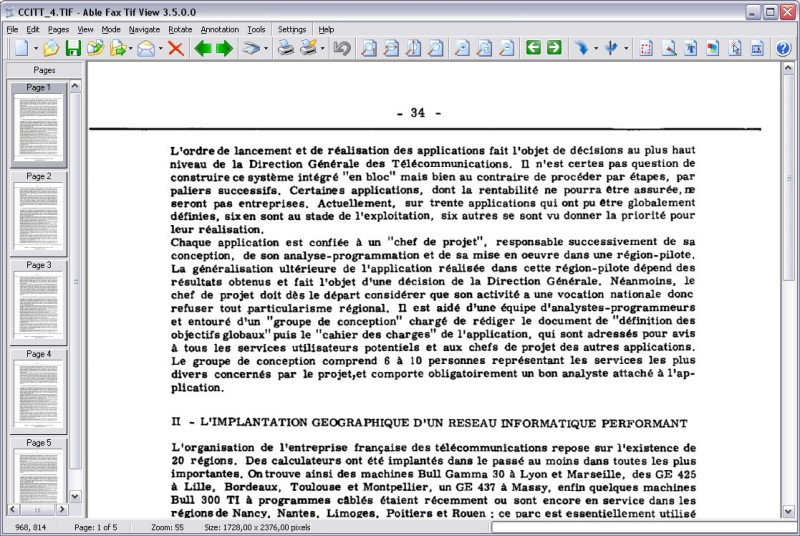 TIF, PDF, EPS, PS, AI, DCX viewer, editor and converter. Allows to view, edit, print, save, convert your files. Able Fax Tif View can convert one- and multipage files to standard TIFF/FAX format, jpeg, png, bmp, pcx, gif, dib, rle, tga, pdf, ps, eps and more. Able Fax Tif View can edit loaded images - extract, move, insert, delete, rotate, flip, invert pages, remove noise, deskewing image, color adjust, add margins.
Windows | Shareware
Read More