


N5 Net Software Repository
Your one-stop for all your software needs.
Search N5 Net Software Repository:
Search Files
Sponsor:
Browse:
- Audio & Multimedia (1527)
- Business (1697)
- Communications (462)
- Desktop (135)
- Development (555)
- Education (163)
- Games & Entertainment (700)
- Graphic Apps (657)
- Home & Hobby (102)
- Network & Internet (524)
- Security & Privacy (499)
- Servers (65)
- System Utilities (8668)
- Web Development (279)
Areas Of Interest
Authors Area
Are you a software author? Take a look at our Author Resource Center where you will find marketing tools, software specifically created for promoting your software and a ton of other helpful resources.
Advanced WiFi-Manager 5.5
Development :: Components & Libraries
(Click to Enlarge)
Advanced WiFi-Manager is a developer tool that allows you to manage wireless networks and settings in Windows 2000, 2003, XP and Vista using one set of API functions. Also Advanced WiFi-Manager provides a COM interface for all API functions so you can simply control WiFi settings from VB or such .NET languages as VB.NET or C#. Advanced WiFi-Manager contains functions for enumerating WiFi adapters, enumerating available networks and getting their settings, functions for connecting and disconnecting to networks, functions for working with wireless networks profiles and much more! Advanced WiFi-Manager can use all ways that Windows has for WiFi networks management: - Wireless Zero Configuration (WZC) API. - NativeWiFi API. - Direct NDIS calls. Another important feature of Advanced WiFi-Manager is ability to enable monitor mode for WiFi adapter and receive all packets on selected channel, even if packets are directed to other adapters and/or access points. Features list: - Supports Windows 2000, 2003, XP, Vista via one set of API. - Supports networks with Open, Shared, WPA, WPA-PSK, WPA2, WPA2-PSK authentification. - Supports networks with WEP, TKIP, AES data encryption. - API for enumerating WiFi adapters and getting or setting their properties. - API for enumeration available wireless networks and getting their properties. - API for connecting and disconnecting to wireless networks. - API for working with network profiles: creating, loading, saving, changing network profiles. For both Windows XP SP2 and Windows Vista all network profiles are stored in XML format according to Windows Vista Native WiFi specifications. - API for working with Windows Firewall. - API for working with general network adapters (both WiFi and LAN). - Additional API for such operations as pinging, getting, setting IP address of adapters, etc. - Unicode support.
Specifications:
Version: 5.5 |
Download
|

Similar Products:
Network & Internet :: Network Monitoring
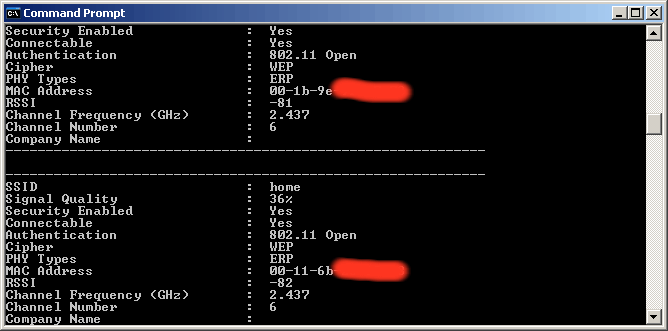 WirelessNetConsole is a small console application that dumps all current detected wireless networks information into the standard output. For each wireless network, the following information is displayed: SSID, Signal Quality in %, PHY types, RSSI, MAC Address, Channel Frequency, and more.
Windows | Freeware
Read More
System Utilities :: Other
 Mouse Speed Switcher is a Windows utility that lets you create up to 10 mouse profiles, each with its own pointer speed, acceleration, scroll lines, button layout, Virtual DPI multiplier and inertia settings. Switch profiles instantly using global hotkeys, the system tray menu, or let the app detect which mouse you are using and apply the right profile automatically. Ideal for laptop users who alternate between a touchpad and an external mouse
Windows | Freeware
Read More
Network & Internet :: Network Monitoring
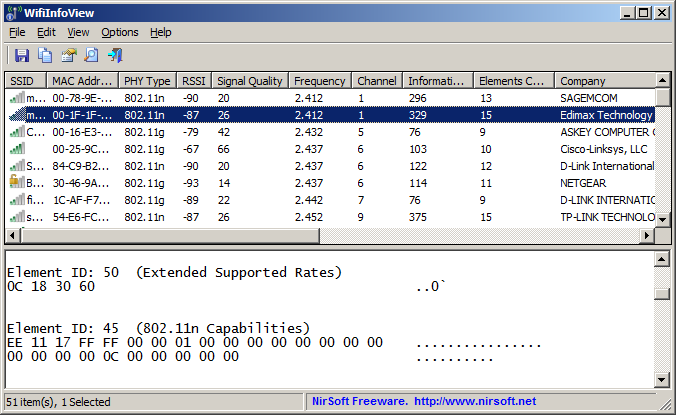 WifiInfoView scans the wireless networks in your area and displays extensive information about them, including: Network Name (SSID), MAC Address, PHY Type (802.11g or 802.11n), RSSI, Signal Quality, Frequency, Channel Number, Maximum Speed, Company Name, Router Model and Router Name (Only for routers that provides this information), and more...
Windows | Freeware
Read More
Network & Internet :: Network Monitoring
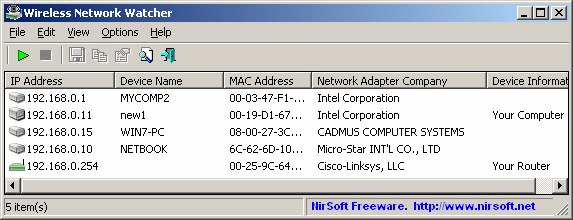 Wireless Network Watcher is a small utility that scans your wireless network and displays the list of all computers and devices that are currently connected to your network.
For every computer or device that is connected to your network, the following information is displayed: IP address, MAC address, the company that manufactured the network card, and optionally the computer name.
Wireless Network Watcher is a small utility that scans your wireless network and displays the list of all computers and devices that are currently connected to your network.
For every computer or device that is connected to your network, the following information is displayed: IP address, MAC address, the company that manufactured the network card, and optionally the computer name.
Windows | Freeware
Read More