


N5 Net Software Repository
Your one-stop for all your software needs.
Search N5 Net Software Repository:
Search Files
Sponsor:
Browse:
- Audio & Multimedia (1582)
- Business (1741)
- Communications (469)
- Desktop (134)
- Development (571)
- Education (165)
- Games & Entertainment (709)
- Graphic Apps (683)
- Home & Hobby (106)
- Network & Internet (544)
- Security & Privacy (505)
- Servers (67)
- System Utilities (9267)
- Web Development (284)
Areas Of Interest
Authors Area
Are you a software author? Take a look at our Author Resource Center where you will find marketing tools, software specifically created for promoting your software and a ton of other helpful resources.
Aryson Office 365 Admin Manager 24.01
System Utilities :: File & Disk Management

(Click to Enlarge)
Aryson Office 365 Admin Manager is a complete solution designed to simplify the management of Office 365 environments for businesses and IT administrators. Its wide range of features and user-friendly interface provide a quick solution to add and modify Signatures and Disclaimers. Moreover, the tool allows administrators to edit and add custom signatures to the emails for the user. This helps maintain consistency in branding and communication across the organization. Another important capability of Office 365 Admin Manager is the ability to create and modify disclaimers for all outgoing emails. Administrators can define custom disclaimers to meet regulatory requirements or convey other important information to recipients. Furthermore, the tool facilitates the bulk import of external contacts to the Office 365 Global Address List (GAL). It simplifies the process of managing contact information for users within the organization. It is compatible with all Windows versions, including Windows 11. You can also download and try its free demo version which allows users to manage up to 5 users or 25 emails. To use the Aryson Office 365 Admin Manager Tool, follow these steps: Download and Install the tool as an administrator. Now, provide the Client ID, Tenant ID, and Client Secret Value. Then, choose the View All Users option to see all users in the tenant account. Use Apply Signature on Office 365 Users to add customized signatures to emails. Opt for Apply Disclaimer Text for Email to provide disclaimer text to emails. Further, select Add External Users to include external users in your account. At last, click Add New Users to create new users for your tenant account.
Specifications:
Version: 24.01 |
Download
|

Similar Products:
System Utilities :: File & Disk Management
 VX Search is an automated, rule-based file search solution capable of searching files by the file type, category, extension, file name, location, size, creation, modification and last access dates, user, file attributes, JPEG EXIF tags, etc. VX Search provides multiple types of file matching rules, user-defined file search profiles and customizable GUI layouts.
Windows | Freeware
Read More
TOOLSBAER OST TO PST MIGRATION TOOL 2.0
System Utilities :: File & Disk Management
 MS Outlook is most popular email-client which creates OST and PST file but some time OST file get unreadable and inaccessible in this situation user need to convert OST into PST data file without disturbing data hierarchy. You can see the preview before the conversion process then save the data into PST file format along with email, inbox, outbox, sent-items, deleted-items, drafts, contacts, calendars, notes (to, cc, bcc, subject, date and time)
Windows | Shareware
Read More
REPAIR OST FILE TO PST FREE 8.0
System Utilities :: File & Disk Management
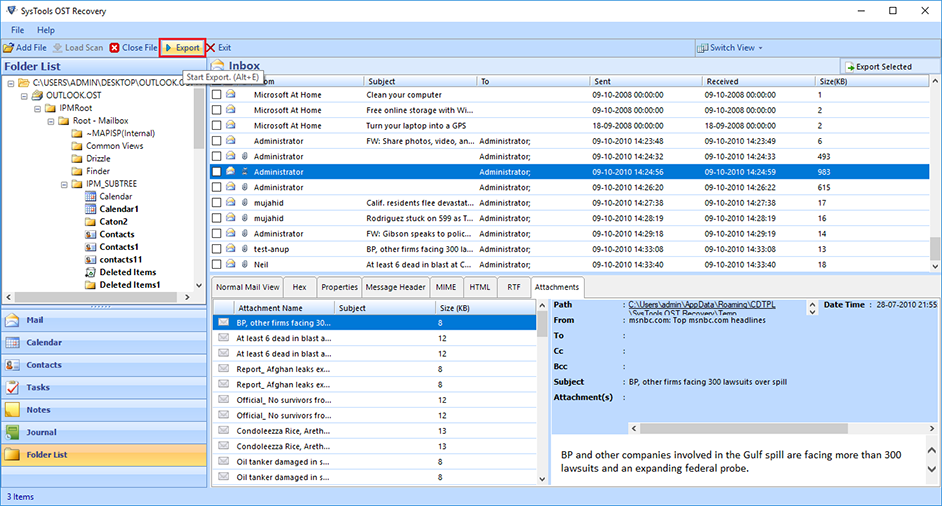 Outlook OST Repair eliminates all corruption of OST files from the scanning process. The tool has two modes: fast or advanced scan. By default, repair Outlook software to OST in a quick scan, but if your data is severely damaged. Ost database, advanced scan is the best. If OST files get damaged due to unexpected errors, repair OST file to PST free. Software Exchange 2010 Repair OST Process useful.
Windows | Shareware
Read More
System Utilities :: File & Disk Management
 DiskSorter Server is a file classification server, which runs in the background as a service and is capable of performing multiple file classification operations, save file classification reports, submit reports to a centralized SQL database, send E-Mail notifications when one or more file classification reports match user-specified rules and conditions, etc.
Windows | Shareware
Read More