


N5 Net Software Repository
Your one-stop for all your software needs.
Search N5 Net Software Repository:
Search Files
Sponsor:
Browse:
- Audio & Multimedia (1527)
- Business (1697)
- Communications (462)
- Desktop (135)
- Development (555)
- Education (163)
- Games & Entertainment (700)
- Graphic Apps (657)
- Home & Hobby (102)
- Network & Internet (524)
- Security & Privacy (499)
- Servers (65)
- System Utilities (8668)
- Web Development (279)
Areas Of Interest
Authors Area
Are you a software author? Take a look at our Author Resource Center where you will find marketing tools, software specifically created for promoting your software and a ton of other helpful resources.
Kernel for Image to PDF 12.06.01
System Utilities :: File & Disk Management

(Click to Enlarge)
Sharing several images over internet is time consuming. Therefore, for quick sharing of images with others, it is better to make a single zipped folder of all image files. But the recipient will have to unzip the zipped folder for viewing the images. Therefore, you can choose a third party utility to make PDF file for several images. Kernel for image to PDF conversion is a proficient utility for storage of single or multiple image files in the portable document. The converted PDF file by the image to PDF conversion utility can be assessed with Adobe PDF reader or other compatible programs. Kernel for image to PDF converter smoothly convert different image files in portable document file format. You with image to PDF conversion program can create single PDF file for each or multiple image files. The software converts image to PDF file in three options i.e., best fit, stretch image and user defined. Kernel for image to PDF supports conversion of all types of images i.e., JPEG, JPG, PNG, TIFF, ICO, JFIF, BMP and JPE. You can install the image to PDF conversion utility on any window platform i.e., window 98, 97, 2000, XP, Vista, 7 and NT. With Kernel for image to PDF converter, you can save the images in A4, A5 or letter page size in the new PDF file. You can use the trial version of image to PDF converter program. With trial version, you can convert single or multiple images to PDF file. However, the demo program produces demo stamp on each image in converter PDF file. You can convert images to PDF without any demo stamp only with full version of the program. For more information please visit: www.nucleustechnologies.com
Specifications:
Version: 12.06.01 |
Download
|

Similar Products:
VERYPDF PDF TO TEXT OCR SDK FOR .NET 2.0
Business :: Office Suites & Tools
 VeryPDF PDF to Text OCR SDK for .NET can recognize text from scanned documents with Optical Character Recognition technology. It can extract text from scanned PDF and even images. As a command line tool, users can implement batch process with batch scripts.
Windows | Shareware
Read More
IMAGE TO PDF CONVERTER FOR MAC 2.1
Business :: Office Suites & Tools
 VeryPDF Image to PDF Converter for Mac converts image to PDF, JPG to PDF in Mac OS X. VeryPDF Image to PDF Converter for Mac helps Mac users convert many kinds of images to PDF files singly or in batches, which can not only save your time, but also save your money. Furthermore, VeryPDF Image to PDF Converter for Mac supports editing properties of PDF files flexibly and professionally.
Windows MAC | Shareware
Read More
CHECKPRIXA IMAGE TO PDF CONVERTER 1.0
Business :: Office Suites & Tools
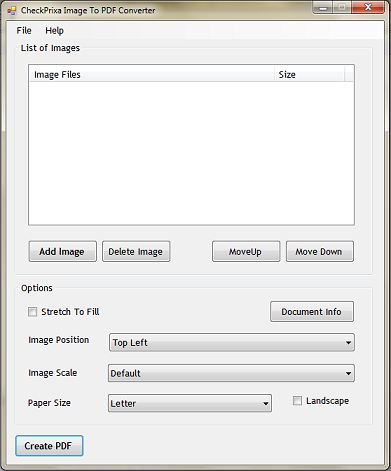 CheckPrixa Image To PDF is a free tool that converts image files to PDF. It is a well tested, fully functional converter capable of handling heavy workload and delivering professional results. The simple user interface allows immediate productive usage upon download and installation. Especially useful for making PDFs out of screenshots, combining photographs into a nice catalog, and turning document scans into an ebook.
Windows | Freeware
Read More
IMAGE TO PDF CONVERTER COMMAND LINE 3.21
Business :: Other
 Image to PDF Converter Command Line is a powerful software for convert image to PDF file. With Image to PDF Converter Command Line,
convert image to PDF, e.g., TIF, TIFF, JPG, JPEG, GIF, PNG, BMP, PSD, WMF, EMF, etc.
Image to PDF Converter Command Line is a powerful software for convert image to PDF file. With Image to PDF Converter Command Line,
convert image to PDF, e.g., TIF, TIFF, JPG, JPEG, GIF, PNG, BMP, PSD, WMF, EMF, etc.
Windows | Shareware
Read More