


N5 Net Software Repository
Your one-stop for all your software needs.
Search N5 Net Software Repository:
Search Files
Sponsor:
Browse:
- Audio & Multimedia (1582)
- Business (1733)
- Communications (469)
- Desktop (135)
- Development (557)
- Education (165)
- Games & Entertainment (706)
- Graphic Apps (681)
- Home & Hobby (105)
- Network & Internet (538)
- Security & Privacy (504)
- Servers (67)
- System Utilities (9263)
- Web Development (281)
Areas Of Interest
Authors Area
Are you a software author? Take a look at our Author Resource Center where you will find marketing tools, software specifically created for promoting your software and a ton of other helpful resources.
Moo0 Always on Top 1.24
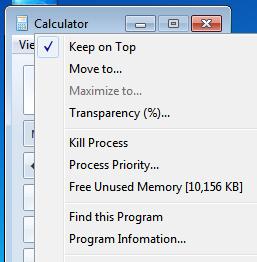
(Click to Enlarge)
Moo0 Always on Top adds extra useful menus in every window's "system window menu". It's the menu that you can access through right-clicking on any window's title bar or taskbar button. This tool can add extra menus there such as "Keep on Top", "Transparency Adjustment", "Process Priority Adjustment", "Various Information about the Program" and so forth. Also, you can configure not to show some menus that you don't use. You can enjoy only useful menus that you want. Tips: - The configuration is available from the TaskTray icon menu. - It is nice to use "Process Priority... -> Above Normal" on video players. - "Always on Top" would be very useful on calculator windows. - "Program Information..." is useful to diagnose/get information about the program displaying the window. Shortcuts: You can also use the following shortcuts for "Always on Top" functionality. - [Pause Key]: First, click and bring the target window foreground, and then press this key on the keyboard. - [Ctrl Key] + [Mouse-Wheel Click]: on the target window.
Specifications:
Version: 1.24 |
Download
|

Similar Products:
MYLANVIEWER NETWORK/IP SCANNER 6.7.8
Network & Internet :: Search/Lookup Tools
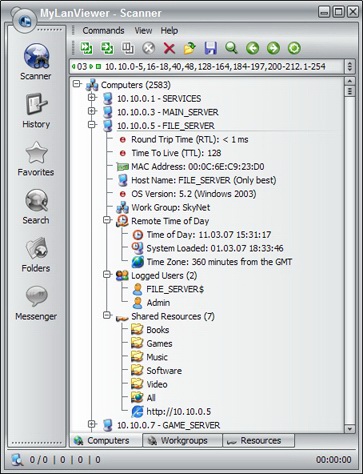 MyLanViewer Network/IP Scanner is a powerful Netbios and Network/IP scanner for LAN, whois and traceroute tool, remote shutdown and Wake-On-Lan (WOL) manager, wireless/Wi-Fi network scanner and monitor. The program scans network and displays your network computers in an easy to read, buddy-list style window that provides the machine names, IP addresses, MAC addresses, shared resources and other technical details for each computer.
Windows | Shareware
Read More
Business :: PIMS & Calendars
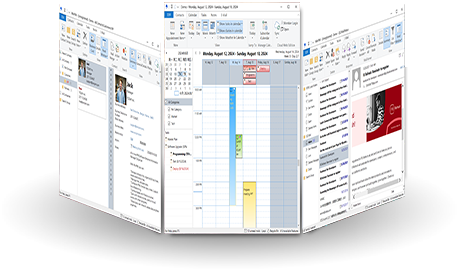 WinPIM is a professional personal information manager (PIM). It is the best software to manage your Contacts, Diaries, Appointments, Tasks, Notes, E-Mails or any other information. WinPIM also gives you an easy and low cost network solution for sharing all data simultaneously with everyone in your workgroup! Users can login the same net data folder with diferent user name and access or with the same user name and access.
Windows | Freeware
Read More
Network & Internet :: Network Monitoring
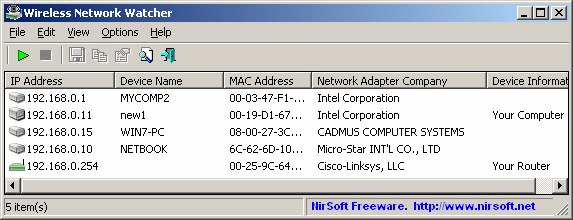 Wireless Network Watcher is a small utility that scans your wireless network and displays the list of all computers and devices that are currently connected to your network.
For every computer or device that is connected to your network, the following information is displayed: IP address, MAC address, the company that manufactured the network card, and optionally the computer name.
Wireless Network Watcher is a small utility that scans your wireless network and displays the list of all computers and devices that are currently connected to your network.
For every computer or device that is connected to your network, the following information is displayed: IP address, MAC address, the company that manufactured the network card, and optionally the computer name.
Windows | Freeware
Read More
CUBEXSOFT SMARTERMAIL EXPORT 12.5
System Utilities :: File & Disk Management
 For SmarterMail export email accounts data to cloud Web/ Desktop Apps, the SmarterMail Export is perfect solution that works as smooth SmarterMail converter program and it enables to convert, transfer SmarterMail files to PST, PDF, MSG, EML, MBOX, DOC, XPS, Thunderbird, WLM, Zimbra, Entourage, O365, Gmail/G Suite, Exchange, Outlook.com, Yahoo.
Windows | Shareware
Read More