


N5 Net Software Repository
Your one-stop for all your software needs.
Search N5 Net Software Repository:
Search Files
Sponsor:
Browse:
- Audio & Multimedia (1527)
- Business (1697)
- Communications (462)
- Desktop (135)
- Development (555)
- Education (163)
- Games & Entertainment (700)
- Graphic Apps (657)
- Home & Hobby (102)
- Network & Internet (524)
- Security & Privacy (499)
- Servers (65)
- System Utilities (8668)
- Web Development (279)
Areas Of Interest
Authors Area
Are you a software author? Take a look at our Author Resource Center where you will find marketing tools, software specifically created for promoting your software and a ton of other helpful resources.
Add 'em Up 1.01
Business :: Calculators & Converters

(Click to Enlarge)
More than just a calculator! Add 'em Up can perform math calculations on data that resides on the Windows Clipboard. Although Add 'em Up can morph into a standard Desktop calculator with one press of the F9 key, it's uniqueness is in its ability to perform math calculations on data that resides on the Windows Clipboard. Let's say you are working in a spreadsheet, Microsoft's Excel, for instance. You have rows upon rows and columns upon columns of data, and you want to perform a math operation on just a select few cells in your spreadsheet. Simply select the cells you want to perform math operations on, then use the "Edit > Copy" (or CTRL+C) function in Excel, which will copy the cells to the Windows Clipboard. Once your selected data is on the Clipboard, then go to the Add 'em Up window (which can stay topmost and visible at all times) and click the "Calculator Clipboard" button. The data that had been copied to the Windows Clipboard is automatically pasted into the Add 'em Up number list. When the number list has been populated with numbers, you can then click on any row or column and perform math calculations on them. Numbers are automatically added, subtracted, multiplied or divided from each other. Handy for quick mathematical operations on groups of numbers. Software developed by Philip Kapusta
Specifications:
Version: 1.01 |
Download
|

Similar Products:
Business :: Calculators & Converters
 With this software you can calculate the net gross sales price
Windows | Freeware
Read More
System Utilities :: Other
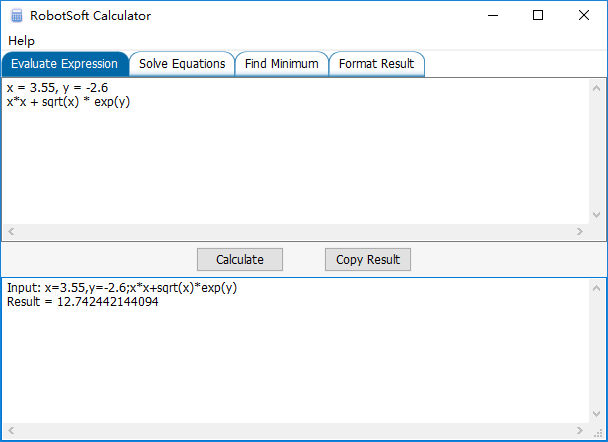 RobotSoft Calculator is an advanced calculator yet very easy to use. It can evaluate expressions and solve equations. And it can do nonlinear optimization work easily.
Windows | Shareware
Read More
Home & Hobby :: Other
 FREE! Have you ever wondered whether it was worth it to drive a few extra miles to save a few cents per gallon on your next gas purchase? The Gas Price Calculator will give you the answer.
Windows | Freeware
Read More
Business :: Accounting & Finance
 Payroll Mate is easy to use, yet powerful payroll system. This payroll software supports multiple companies with multiple employees. Hourly, salaried, bonus, sick, other pay and unlimited number of user-defined income types. Unlimited number of user-defined deduction and tax types including taxable and allocated tips. Doing payroll is fast and easy with this payroll software. This payroll program also prints checks and generates payroll forms.
Windows | Shareware
Read More