


N5 Net Software Repository
Your one-stop for all your software needs.
Search N5 Net Software Repository:
Search Files
Sponsor:
Browse:
- Audio & Multimedia (1582)
- Business (1741)
- Communications (469)
- Desktop (134)
- Development (571)
- Education (165)
- Games & Entertainment (709)
- Graphic Apps (683)
- Home & Hobby (106)
- Network & Internet (544)
- Security & Privacy (505)
- Servers (67)
- System Utilities (9267)
- Web Development (284)
Areas Of Interest
Authors Area
Are you a software author? Take a look at our Author Resource Center where you will find marketing tools, software specifically created for promoting your software and a ton of other helpful resources.
BatteryMon 2.1.1010

(Click to Enlarge)
Batteries, given their chemical nature, are prone to wear, corrosion, leakage and outright failure due to events like short circuits and lightning strikes. Given their propensity to fail and to have decreased performance over time, it is important to be able to identify and monitor their performance. With BatteryMon, monitoring the state of your battery has never been easier. BatteryMon is an easy to use Windows program that allows the monitoring of laptop computer batteries and uninterruptible power supplies (UPS). Graphically see the battery charge / discharge rate, diagnose problem battery cells, compare your batteries performance with expected discharge rates and see the status of each individual battery pack (when multiple batteries are in use). Batteries and BIOS must comply with the Windows, Advanced Configuration and Power Interface (ACPI) specification in order for BatteryMon to work correctly. More than 20 statistics are provided including voltage levels, battery chemistry, full capacity level, current capacity, bias settings, device names and serial numbers. A log file is maintained of the battery charge level and other statistics for later analysis and the software comes with a comprehensive help file.
Specifications:
Version: 2.1.1010 |
Download
|

Similar Products:
System Utilities :: Other
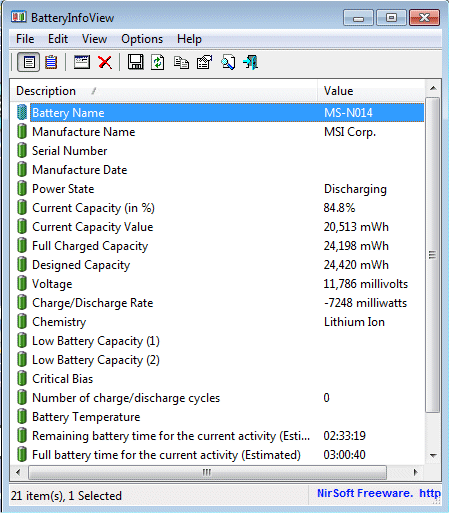 BatteryInfoView is a small utility for laptops and netbook computers that displays the current status and information about your battery. The displayed battery information includes the battery name, manufacture name, serial number, manufacture date, power state (charging/discharging), current battery capacity, full charged capacity, voltage, charge/discharge rate, and more...
Windows | Freeware
Read More
System Utilities :: Other
 Quickly and easily switch between up to 10 mouse speed settings. This can be useful for netbook or laptop users who frequently switch between the touchpad and an external mouse but prefer different speed and sensitivity settings for each. You can switch to different mouse settings from the system tray icon, via keyboard hotkeys or let the program do it automatically when the mouse (or the touchpad) is used.
Windows | Freeware
Read More
System Utilities :: Other
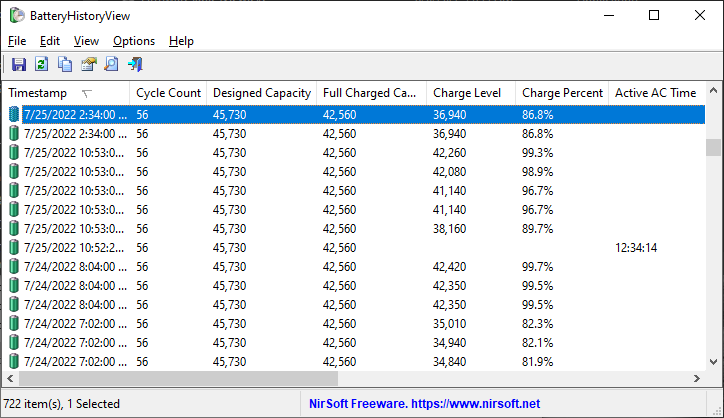 BatteryHistoryView extracts and displays the battery history information stored in the SRUDB.dat database of Windows 10 and Windows 11.
The battery history information is automatically collected by Windows operating systems and includes the following information: Timestamp, Cycle Count, Designed Capacity, Full Charged Capacity, Charge Level, Charge Percent, Active AC Time, CS AC Time, Active DC Time, CS DC Time, Active Discharge Time, and more..
BatteryHistoryView extracts and displays the battery history information stored in the SRUDB.dat database of Windows 10 and Windows 11.
The battery history information is automatically collected by Windows operating systems and includes the following information: Timestamp, Cycle Count, Designed Capacity, Full Charged Capacity, Charge Level, Charge Percent, Active AC Time, CS AC Time, Active DC Time, CS DC Time, Active Discharge Time, and more..
Windows | Freeware
Read More
System Utilities :: Other
 KeyboardTest is an easy to use Windows based application that allows users to quickly check that all the keys on their computer keyboard are functioning correctly and look at the internal scan codes being generated by the keyboard. The down and up stroke of each key is registered and highlighted on a graphical image of a keyboard. Each time a key is pressed a variety of state information is updated in the window.
Windows | Shareware
Read More