


N5 Net Software Repository
Your one-stop for all your software needs.
Search N5 Net Software Repository:
Search Files
Sponsor:
Browse:
- Audio & Multimedia (1565)
- Business (1732)
- Communications (466)
- Desktop (182)
- Development (569)
- Education (166)
- Games & Entertainment (707)
- Graphic Apps (683)
- Home & Hobby (105)
- Network & Internet (543)
- Security & Privacy (500)
- Servers (65)
- System Utilities (9315)
- Web Development (281)
Areas Of Interest
Authors Area
Are you a software author? Take a look at our Author Resource Center where you will find marketing tools, software specifically created for promoting your software and a ton of other helpful resources.
CarbonFolder 1.3
System Utilities :: File & Disk Management
(Click to Enlarge)
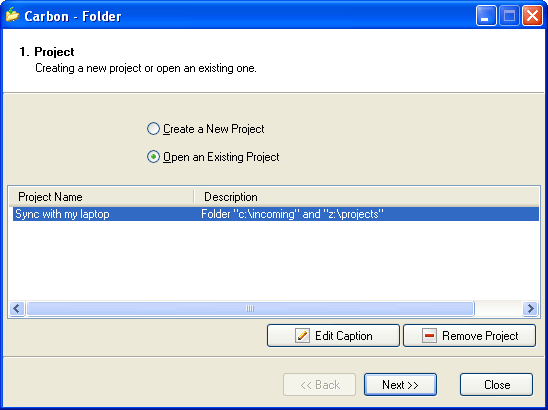
CarbonFolder is a small and extremely simple in use utility for synchronization of files in local folders and folders in local network. For instance, it lets you perform fast synchronization of files on your desktop PC and a notebook in the local network. There is no doubt that the synchronization of data is quite an exhausting process, especially when it is performed manually. CarbonFolder allows you to automate this process without any efforts. For your convenience, any newly created task can be saved for the next launch. The synchronization of files with CarbonFolder is easy as a pie: all the user has to do is to start the program and follow the instructions of the wizard. The full process takes just 5 steps. Firstly, the utility offers you to create a new project or open an existing one. Secondly, source and destination folders should be selected. Thirdly, the synchronization mode should be specified. It can be done in two ways: bidirectional or unidirectional. Besides, it is possible to make an exact copy of folder 1 in folder 2, include subfolders or use advanced options like including or excluding particular files from synchronization. After that, the user should verify synchronization parameters, click the "Synchronize Folders" button and the task is completed. Finally, the program asks if the user wants to save the task or not. The best thing about CarbonFolder is its total simplicity and ease of use. The program has a simple interface designed as a step-by-step wizard, which is very common among Windows applications and is clear to any user. It takes you just a minute and a few clicks to synchronize data. CarbonFolder supports Microsoft Windows 98/Me/NT/2000/2003/XP/Vista.
Specifications:
Version: 1.3 |
Download
|

Similar Products:
System Utilities :: File & Disk Management
 If you want to export IMAP account database to Desktop or cloud services, then you can give a try to IMAP Export Tool. It?s a smart utility that supports to import multiple IMAP accounts PST, MBOX, PDF, EML, Gmail, Office 365, G Suite, Outlook.com, Exchange Server, Hosted Exchange, IMAP Server, Amazon Server, Yahoo Mail at once in batch mode.
Windows | Shareware
Read More
PURAN DELETE EMPTY FOLDERS 1.2.1
System Utilities :: System Maintenance
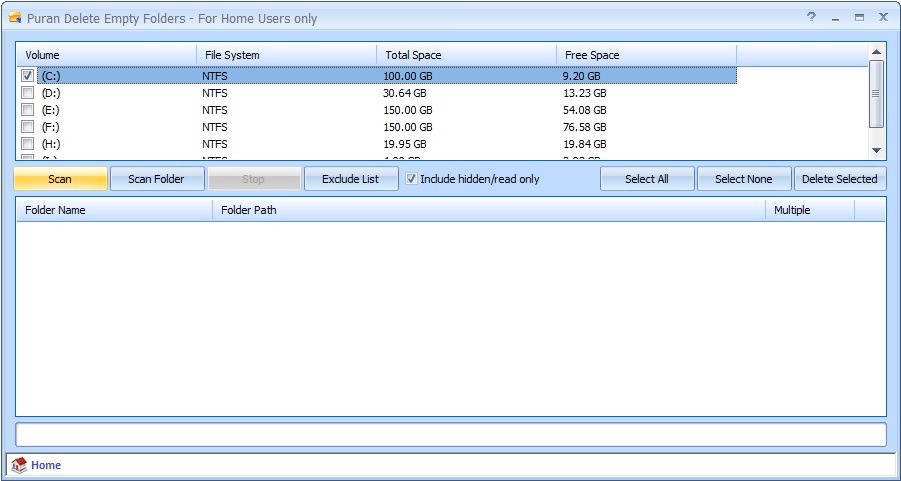 Puran Delete Empty Folders is a free utility that can be used to find and delete empty folders from your computer. It is extremely fast and takes less than 10 seconds usually. You can exclude the folders you do not want to scan.
Windows | Freeware
Read More
Security & Privacy :: Other
 File Monster completely erases files from your system -- actually overwriting the information in the file so it can not be recovered. The reason information is still available when you delete files with normal deletion methods is because normal deletion methods only tell the operating system to not recognize the file as being present anymore, yet the information hasn't really been erased.
Windows | Shareware
Read More
System Utilities :: File & Disk Management
 Search files for one or more search terms at the same time via a very friendly interface. Optionally search subfolders too! Just point to the folder you want to search, provide a list of search terms, then select SEARCH. Results of your most recent search are saved to a file called FOUND.TXT. If you want to view, edit, or save it as another name, you can do so after the search process is complete, or you can select View Last Search Results.
Windows | Shareware
Read More