


N5 Net Software Repository
Your one-stop for all your software needs.
Search N5 Net Software Repository:
Search Files
Sponsor:
Browse:
- Audio & Multimedia (1582)
- Business (1733)
- Communications (469)
- Desktop (135)
- Development (557)
- Education (165)
- Games & Entertainment (706)
- Graphic Apps (681)
- Home & Hobby (105)
- Network & Internet (538)
- Security & Privacy (504)
- Servers (67)
- System Utilities (9263)
- Web Development (281)
Areas Of Interest
Authors Area
Are you a software author? Take a look at our Author Resource Center where you will find marketing tools, software specifically created for promoting your software and a ton of other helpful resources.
Odbc 4 All 2.4
(Click to Enlarge)
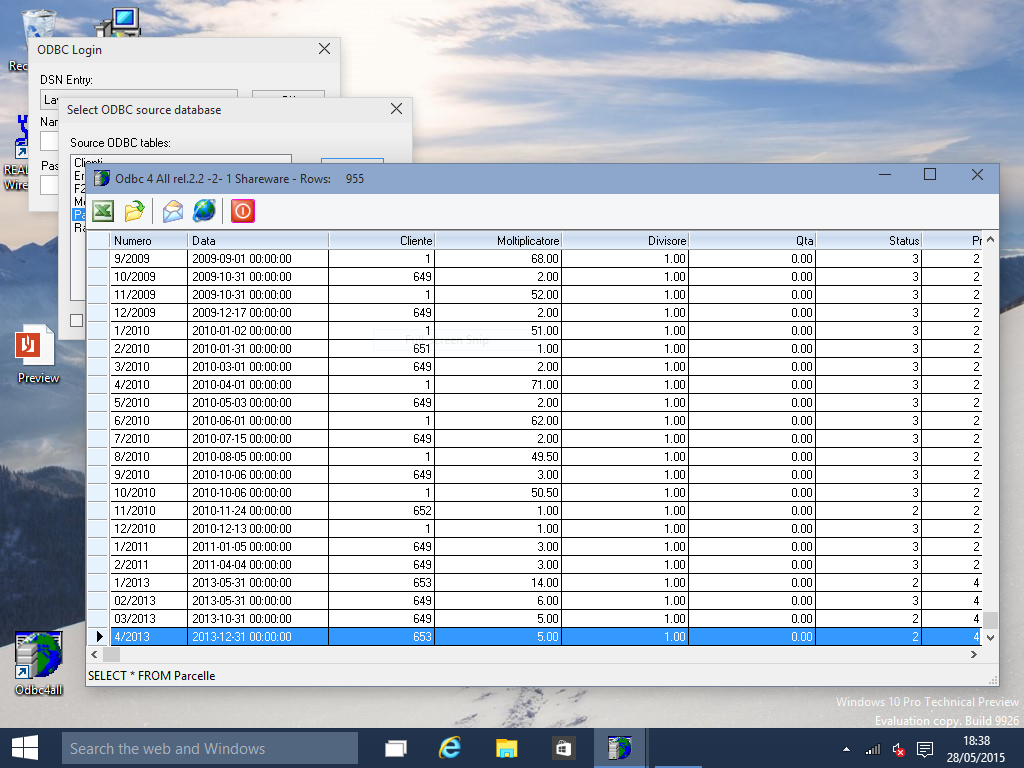
ODBC 4 ALL is a 32 bit Windows utility designed to easily allow any application, including DOS apps and batch files, to run SQL queries using any ODBC data source, (Access, Informix, MySql, Oracle, Sql Server, ...), redirecting the output to the screen, an ascii file / table or a DBF table. When run in interactive mode, you can interactively choose the ODBC Data Source and Table, then insert the SQL command to send to the database server. If the command is a SELECT, the SQL results can even be automatically shown on a screen grid (while INSERT, UPDATE etc. usually do not provides any output); you can browse the data there, send it to an Excel spreedshet, or create a configuration file to run the query again, later on, in batch mode. Batch mode is particularly useful to use it inside a 3rd party application. You can manually create an ascii configuration file, or let the screen grid automatically creating it for you, then run ODBC4ALL.EXE to obtain the results of the SQL query into the desired output format. In this case user intervention is not required. Even the error messages could be redirected to an ascii file (for example if the SQL query contains a syntax error, or if the database server is unreachable because the server PC is down) allowing the running application to check for errors before managing the results. Ascii tables are particularly useful to obtain data views which are automatically printable by using our Printfil - Windows Printing System for Applications software ( www.Printfil.com ), or sent out via e-mail by using our FileInMail software ( www.FileInMail.com ) The two modes can be mixed, allowing you to run it in interactive mode obtaining an ascii output file or to run it from within your application only to automatically show the results of the query to the user.
Specifications:
Version: 2.4 |
Download
|

Similar Products:
SUGARCRM ODBC DRIVER BY DEVART 1.13.0
Development :: Other
 Devart ODBC Driver for SugarCRM is a high-performance connectivity tool with enterprise-level features for accessing SugarCRM from ODBC-compliant reporting, analytics, BI, and ETL tools on both 32-bit and 64-bit Windows. Our ODBC driver fully supports standard ODBC API functions and data types and enables easy access to live SugarCRM data from anywhere.
Windows | Shareware
Read More
ZOHO CRM ODBC DRIVER BY DEVART 3.1.0
Development :: Other
 Devart ODBC Driver for Zoho CRM is a high-performance connectivity tool with enterprise-level features for accessing Zoho CRM from ODBC-compliant reporting, analytics, BI, and ETL tools on both 32-bit and 64-bit Windows. Our ODBC driver fully supports standard ODBC API functions and data types and enables easy access to live ZohoCRM data from anywhere.
Windows | Shareware
Read More
XBASE ODBC DRIVER BY DEVART 6.0.0
Development :: Components & Libraries
 Devart ODBC Driver for xBase is a high-performance connectivity tool with enterprise-level features for accessing FoxPro, Visual FoxPro, dBase, and other databases in DBF file formats from ODBC-compliant reporting, analytics, BI, and ETL tools on 32-bit and 64-bit Windows, macOS, and Linux. Our ODBC driver fully supports standard ODBC API functions and data types and enables easy and secure access to live xBase data from anywhere.
Windows | Shareware
Read More
MONGODB ODBC DRIVER BY DEVART 6.0.0
Development :: Other
 Devart ODBC Driver for MongoDB is a high-performance connectivity tool with enterprise-level features for accessing MongoDB databases from ODBC-compliant reporting, analytics, BI, and ETL tools on both 32-bit and 64-bit Windows, macOS, and Linux. Our ODBC driver fully supports standard ODBC API functions and data types and enables easy and secure access to live MongoDB data from anywhere.
Windows | Shareware
Read More