


N5 Net Software Repository
Your one-stop for all your software needs.
Search N5 Net Software Repository:
Search Files
Sponsor:
Browse:
- Audio & Multimedia (1596)
- Business (4238)
- Communications (1257)
- Desktop (183)
- Development (602)
- Education (171)
- Games & Entertainment (702)
- Graphic Apps (686)
- Home & Hobby (107)
- Network & Internet (571)
- Security & Privacy (532)
- Servers (65)
- System Utilities (11196)
- Web Development (284)
Areas Of Interest
Authors Area
Are you a software author? Take a look at our Author Resource Center where you will find marketing tools, software specifically created for promoting your software and a ton of other helpful resources.
FreeDiff 1.1.2
System Utilities :: File & Disk Management

(Click to Enlarge)
FreeDiff is a free file difference viewer for Windows 95/98/ME - Windows 2000/NT/XP. Use it to analyze the changes between two revisions of a file. Note: FreeDiff is not an editor. The differences between files can be viewed but the files can not be modified. FreeDiff can be used to locate the differences in program source code files, HTML documents, and any other ASCII-based text files. A color-coded side-by-side display of the comparison results makes it easy to understand the differences between the two files at a glance. Other file types can also be compared if they are first saved in a text format. For example, MS Word documents and MS Excel spreadsheets can be saved in text format and compared. Two versions of the System Registry database can be exported from within RegEdit and then compared using FreeDiff. Features: Allows drag and drop of files onto FreeDiff for comparison Auto-completes file specifications as they are typed in Compares ASCII text files in a side-by-side format Differences are shown with color highlighting Differences down to the character-level are shown Easy navigation from one difference to another Search for text within the files Bookmarks can be added to the comparison results Ignore Space and Ignore Case comparison options supported Files can be printed with the differences pointed out Free of charge!
Specifications:
Version: 1.1.2 |
Download
|

Similar Products:
System Utilities :: File & Disk Management
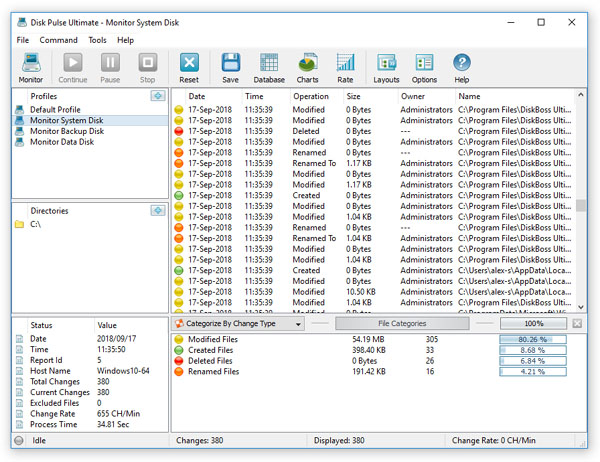 DiskPulse Server is a powerful and easy-to-use disk change monitoring server allowing one to monitor one or more disks or directories and detect file creations, modifications, name changes and delete operations in real-time. DiskPulse Server runs in the background as a service and may be controlled locally or remotely through the network using a client GUI application or a command line utility.
Windows | Shareware
Read More
TOOLSBAER OST TO PST MIGRATION TOOL 2.0
System Utilities :: File & Disk Management
 MS Outlook is most popular email-client which creates OST and PST file but some time OST file get unreadable and inaccessible in this situation user need to convert OST into PST data file without disturbing data hierarchy. You can see the preview before the conversion process then save the data into PST file format along with email, inbox, outbox, sent-items, deleted-items, drafts, contacts, calendars, notes (to, cc, bcc, subject, date and time)
Windows | Shareware
Read More
CUBEXSOFT OUTLOOK DUPLICATE REMOVER 1.2
System Utilities :: File & Disk Management
 Need to know how to delete Outlook duplicate mailbox, then go with the CubexSoft Outlook Duplicate Remover Tool ? a best and automated tool to perfectly and precisely remove all duplicate items from Outlook along with all emails, and attachments. The Outlook Duplicate Remover tool also allows selective duplicate deletion from Outlook mailbox with help of date-filter facility.
Windows | Shareware
Read More
REPAIR OST FILE TO PST FREE 8.0
System Utilities :: File & Disk Management
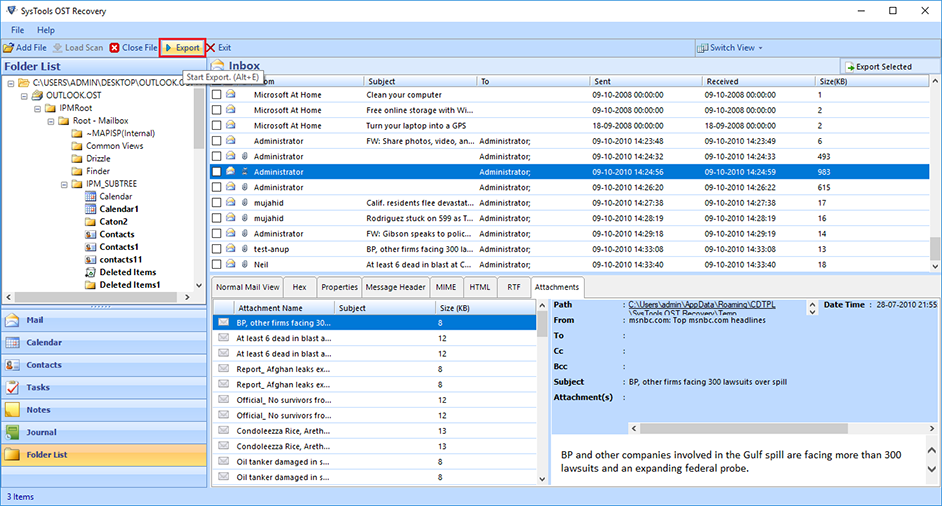 Outlook OST Repair eliminates all corruption of OST files from the scanning process. The tool has two modes: fast or advanced scan. By default, repair Outlook software to OST in a quick scan, but if your data is severely damaged. Ost database, advanced scan is the best. If OST files get damaged due to unexpected errors, repair OST file to PST free. Software Exchange 2010 Repair OST Process useful.
Windows | Shareware
Read More