


N5 Net Software Repository
Your one-stop for all your software needs.
Search N5 Net Software Repository:
Search Files
Sponsor:
Browse:
- Audio & Multimedia (1582)
- Business (1733)
- Communications (469)
- Desktop (135)
- Development (557)
- Education (165)
- Games & Entertainment (706)
- Graphic Apps (681)
- Home & Hobby (105)
- Network & Internet (538)
- Security & Privacy (504)
- Servers (67)
- System Utilities (9263)
- Web Development (281)
Areas Of Interest
Authors Area
Are you a software author? Take a look at our Author Resource Center where you will find marketing tools, software specifically created for promoting your software and a ton of other helpful resources.
Live Signatures 2.5.8
Communications :: Other E-Mail Tools
(Click to Enlarge)
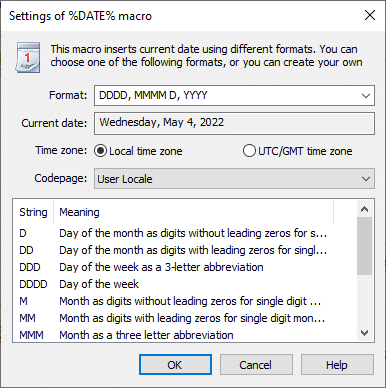
The program Live Signatures is an easy and handy tool for automatic substitution of actual data in outgoing messages. A wide set of macros will allow you to automatically insert text into E-mails from other messages or local files, use changeable/variable signatures in the messages, enrich the messages with the statements of famous people (or your own expressions). Because of the macros system, you can insert auto-text or signatures only in the necessary messages, or also in all messages, if the macro Live Signatures is added to the signatures of Microsoft Outlook. Moreover, Live Signatures gives a possibility to enhance the number of macros by creating or linking them up. The program functions are not restricted to simple adding of a corporate signature to the messages. On the basis of Live Signatures you can organize automated mailing of company news, sending automatically created journals of program operations, weekly sending of price-lists or reports. You can also insert posts from your blog, or any other RSS-feed. With the help of Live Signatures the variable data can be sent by mail or used in the email signatures without making any changes during the message creation. Live Signatures doesn't replace the built-in templates for signatures in Microsoft Outlook, it extends their functionality and makes them live: you can modify your current signature templates in Microsoft Outlook by adding new macros from Live Signatures. Add-in works with all types of Microsoft Outlook message editors and supports all message formats (HTML, Plain Text, RTF). Any message in Microsoft Outlook (including message in public folders of Microsoft Exchange Server), RSS-feed or file saved locally or in the public folder can be used as a data source. Product homepage: https://www.mapilab.com/outlook/live_signatures/
Specifications:
Version: 2.5.8 |
Download
|

Similar Products:
SAMETOOLS OST TO PST EXPORTER 1.0.1
System Utilities :: File & Disk Management
 The ost to pst converter software supplied by is a entire tool that incorporates the delivered capability to scan and recover corrupt ost file, as well as convert ost document to pst document with different a couple of layout inclusive of pst, eml, emlx, msg, mbox, vcard, vcal/ics and html with all original e-mail facts.
Windows | Shareware
Read More
MAILSDADDY PST TO IMAP MIGRATION TOOL V1.3
System Utilities :: File & Disk Management
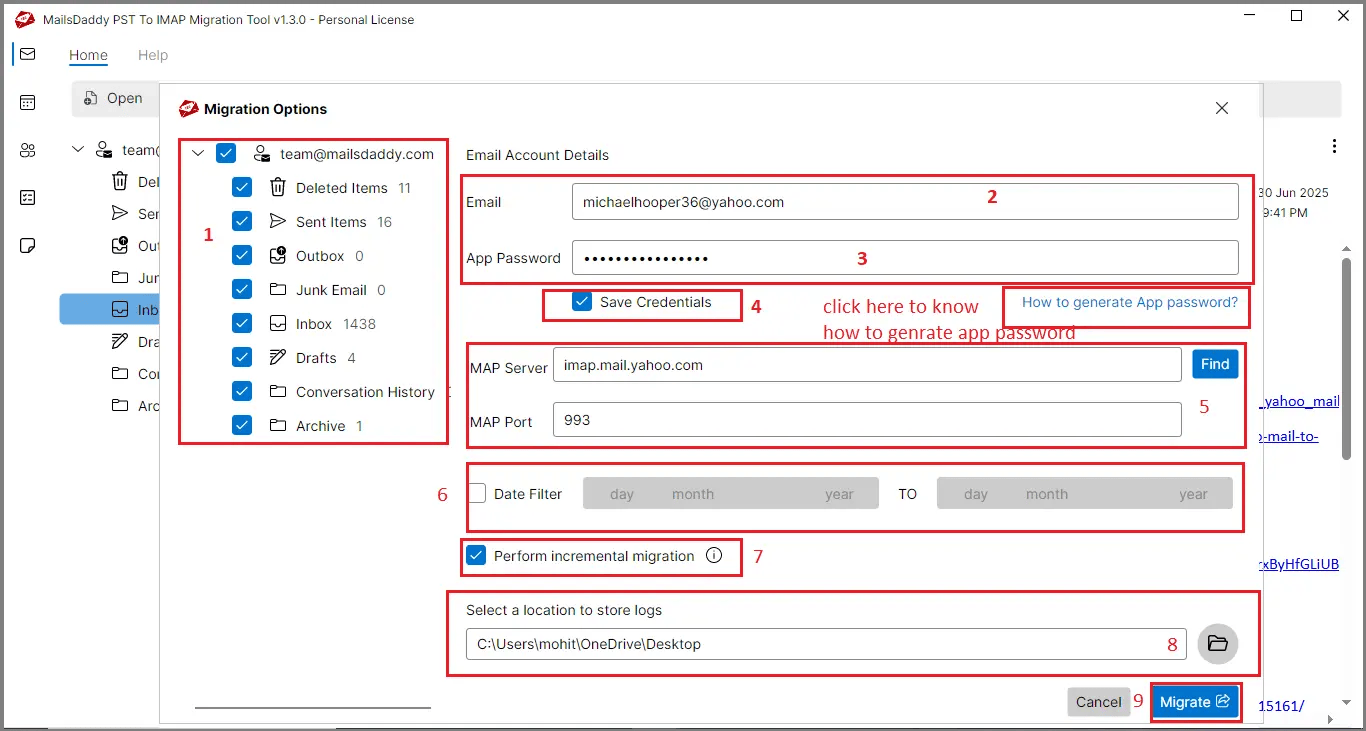 Using MailsDaddy PST to IMAP Migration Tool, users can upload Outlook PST files to Gmail, Yahoo, and other IMAP accounts. The software preserves attachments, email properties, and folder hierarchy, supports bulk migration, and provides a fast, secure, and reliable way to transfer emails without data loss.
Windows | Shareware
Read More
CUBEXSOFT OUTLOOK DUPLICATE REMOVER 1.1
System Utilities :: File & Disk Management
 Need to know how to delete Outlook duplicate mailbox, then go with the CubexSoft Outlook Duplicate Remover Tool ? a best and automated tool to perfectly and precisely remove all duplicate items from Outlook along with all emails, and attachments. The Outlook Duplicate Remover tool also allows selective duplicate deletion from Outlook mailbox with help of date-filter facility.
Windows | Shareware
Read More
System Utilities :: File & Disk Management
 If you are looking to export Outlook data to MBOX, then no need to search anymore, PST to MBOX Converter online Windows solution is available to help you out. PST to MBOX Converter is a smart application which is capable to convert deleted items folder from MS Outlook to MBOX. Simply download & export PST file to MBOX in three easy steps.
Windows | Shareware
Read More