


N5 Net Software Repository
Your one-stop for all your software needs.
Search N5 Net Software Repository:
Search Files
Sponsor:
Browse:
- Audio & Multimedia (1582)
- Business (1741)
- Communications (469)
- Desktop (134)
- Development (571)
- Education (165)
- Games & Entertainment (709)
- Graphic Apps (683)
- Home & Hobby (106)
- Network & Internet (544)
- Security & Privacy (505)
- Servers (67)
- System Utilities (9267)
- Web Development (284)
Areas Of Interest
Authors Area
Are you a software author? Take a look at our Author Resource Center where you will find marketing tools, software specifically created for promoting your software and a ton of other helpful resources.
Image to PDF OCR Converter Command Line 5.0
Business :: Office Suites & Tools

(Click to Enlarge)
Image to PDF OCR Converter Command Line is an easy-to-use software for convert image to PDF file via OCR by Command Line. Convert image files to PDF files, it supports TIF, TIFF, JPG, JPEG, GIF, PNG, BMP, PSD, WMF, EMF, PCX, PIC, etc. formats. It can convert scanned PDF file to plain text PDF file, it can also make a scanned PDF file from signed PDF or filled PDF file. It does use JBIG2 and JPEG2000 compression to compress PDF files smaller. VeryPDF Image to PDF OCR Converter Command Line has following features, 1. You can customize description of created PDF, such as title, subject, author, and keywords. 2. This program is independent of a third-party PDF reader or creator. 3. Make searchable PDF from images with OCR by command line. 4. Create searchable PDF directly from scanned images like TIF, JPG, PNG, etc. 5. Support unattended conversion for files in specified directories. 6. Encrypt created PDF with user password or/and owner password of 48 or 128-bit. 7. Combine multiple images into one PDF. 8. Able to insert or append newly converted PDF to existing PDF. 9. Automatically preview converted PDF with an associated application. 10. Convert text based PDF files to scanned PDF files, simulate the scanner. 11. Extract a page range from PDF file and save to a new scanned PDF file. 12. Enhanced OCR engine to convert from scanned PDF file to searchable PDF files. 13. Convert color PDF file to grayscale or black/white PDF file. 14. Make scanned PDF files from signed PDF files. 15. Convert image to PDF or PDF to image with more options. 16. Support JBIG2 and JPEG2000 compression methods.
Specifications:
Version: 5.0 |
Download
|

Similar Products:
Business :: Office Suites & Tools
 Okdo Png to Pdf Converter is a powerful and easy pdf converter which can help you batch convert png image format files to your personal PDF with ease. It is super simple so it is affordable for everyone whether your are a beginner or a veteran. All you need to do is to add your converted files to list then click "Convert" is ok. The speed is super fast, the quality is super good. It has numerous advantages for you to use.
Windows | Shareware
Read More
AILT ALL DOCUMENT TO PDF CONVERTER 7.1
Business :: Office Suites & Tools
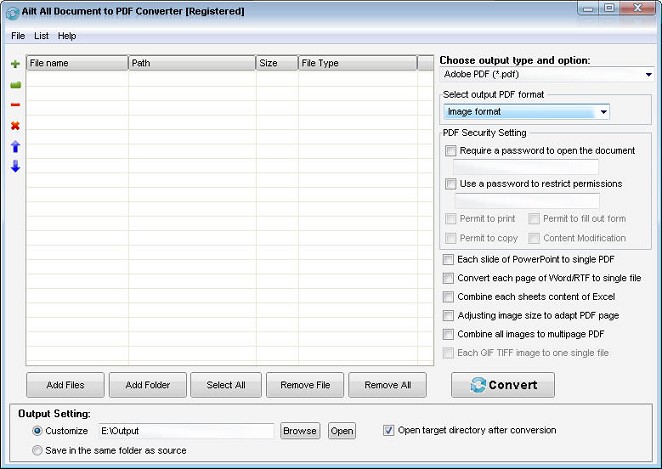 Ailt All Document to PDF Converter is a useful and handy converter used to batch easil convert any file format like Word, Excel, PowerPoint, TXT, HTML, JPEG, BMP, GIF, TIFF, EMF, WMF etc to PDF. The conversion tool provides users with fast conversion speed. It can support comprehensive formats: DOC, DOCX, DOCM, RTF, XLS, XLSX, XLSM, PPT, PPTX, PPTM, TXT, HTM, HTML, JPG, JPEG, BMP, EMF, WMF, TIFF, GIF, PNG, PCX, J2K, JP2 etc.
Windows | Shareware
Read More
AILT IMAGE TO PDF CONVERTER 7.1
Business :: Office Suites & Tools
 Ailt Image to PDF Converter provides the fast and easy way to batch convert images like JPG, JPEG, BMP, TIFF, WMF,EMF etc to PDF with accurately retaining the layout of original image file.The conversion tool provides users with fast conversion speed. It can support comprehensive formats: JPG, JPEG,BMP,PNG,TIFF, GIF, WMF, EMF, PCX, JP2, J2K etc.
Windows | Shareware
Read More
AILT JPEG BMP TIFF GIF TO PDF CONVERTER 7.1
Business :: Office Suites & Tools
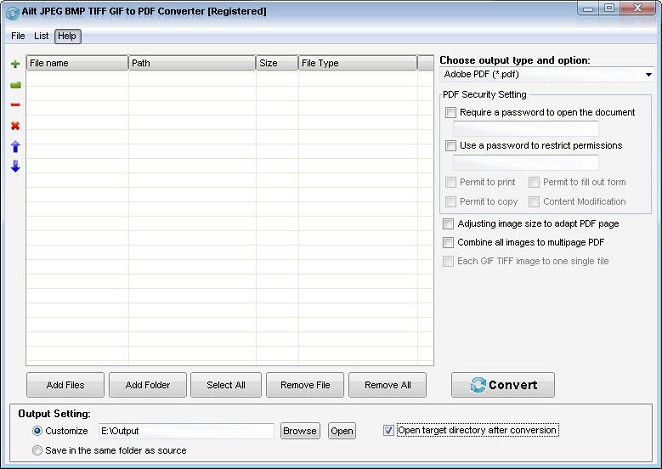 Ailt JPEG BMP TIFF GIF to PDF Converter can help you batch convert JPEG, JPG, BMP, TIFF, TIF, GIF to PDF with accurately preserving the layout of original image files. It is one standalone program and does not require Adobe Acrobat or Acrobat Reader. Its easy-to-use interface allows you to create PDF files by simply click "Convert" from JPEG, JPG, BMP, TIFF, TIF, GIF images.
Windows | Shareware
Read More