


N5 Net Software Repository
Your one-stop for all your software needs.
Search N5 Net Software Repository:
Search Files
Sponsor:
Browse:
- Audio & Multimedia (1565)
- Business (1732)
- Communications (466)
- Desktop (182)
- Development (569)
- Education (166)
- Games & Entertainment (707)
- Graphic Apps (683)
- Home & Hobby (105)
- Network & Internet (543)
- Security & Privacy (500)
- Servers (65)
- System Utilities (9315)
- Web Development (281)
Areas Of Interest
Authors Area
Are you a software author? Take a look at our Author Resource Center where you will find marketing tools, software specifically created for promoting your software and a ton of other helpful resources.
Custom Card & Label Maker Application 8.2.1.0
Business :: Inventory & Barcoding
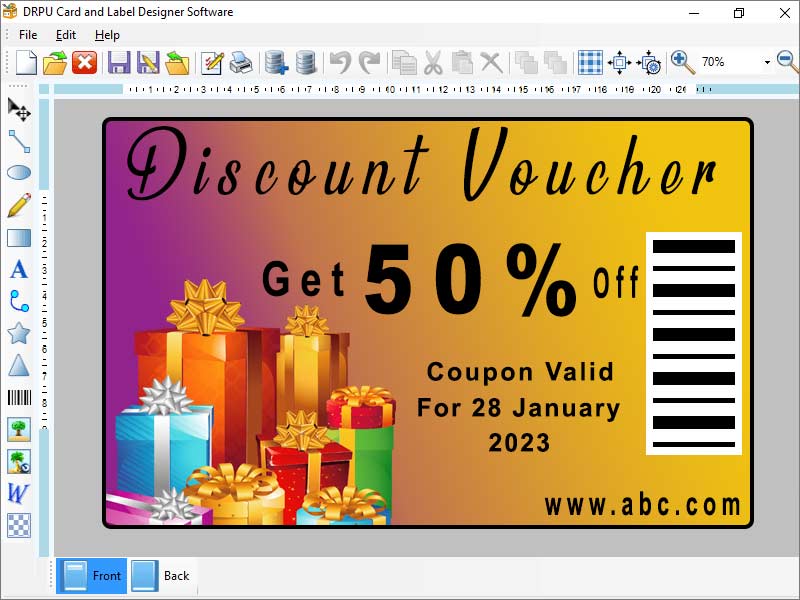
(Click to Enlarge)
Cards & Labels Designing Application design and print custom labels and stickers by using a friendly graphical user interface with advanced printing options. Card Maker Software quickly creates a large number of high-quality printed ID cards or labels for a variety of official and business applications, such as stores, shipping, Communications Company, transportation, and many more. Steps to generate cards by using Card and label designer software: Step 1: Download and Launch Card and Label Maker Software. Step 2: Choose one option among Start with New Label Format or Open with Existing Label Format Step 3: After selecting Start with New Label Format, select Create Label by using wizard Step 3(I): Specify the label name and size. You can click on Get Size from Printer button to get label size from printer. Step 3(II): A new window will appear after Clicking Next button. You can choose fold type for your card such as: Quarter Fold, Half Fold and Postcard. Step 3(III): Select a shape for your card such as: Rectangle, Rounded Rectangle, Ellipse or CD/DVD. Step 3(IV): Set background of your card in Solid, Gradient or Image format and click next. Add Text to your card if you want otherwise click next button to move further. Step 3(V): Set password to your card to prevent the access of your card for other people. Click on Finish button to see your created card. You can use multiple designing tools to customize your card. Data Set Series option allow you to create multiple card and labels with text and barcode. Step 3 (a): After selecting Create Label with Blank format a new window will appear. Fill in all the necessary properties and click Finish button. Step 3(b): After that you can see your card or label. You can customize it with different designing tools, Data Set Series, Symbols and Images. Step 4: After designing your card you can save your card as template or image. You can also print your card or label by using inbuilt Print Setting option.
Specifications:
Version: 8.2.1.0 |
Download
|

Similar Products:
SCANPOINT - ARCHIVE MANAGEMENT SOFTWARE 4.00.XX
Business :: Inventory & Barcoding
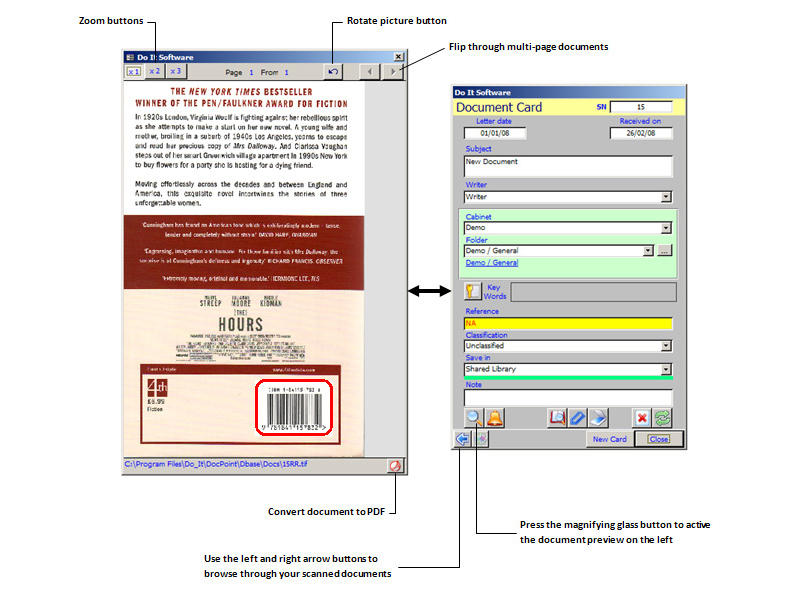 ScanPoint is an OCR and barcode-ready archive and imaging management solution that provides organizations of any size with a powerful and affordable paperless office solution. ScanPoint gives you the power to file documents quickly by capturing index criteria from barcodes embedded in a scanned document.
Windows | Shareware
Read More
Business :: Inventory & Barcoding
 Whether you are designing and printing labels for internal use or for your customers, Tattoo ID Enterprise lets you
produce labels with fixed or dynamic text, pictures and barcodes. Dynamic data can come from a wide variety of
sources, including your company's database. Create labels for FDA, OSHA, HIBCC or AIAG compliance, inventory,
shipping, or tracking. Control label design at a central location, print remotely, throughout your company.
Whether you are designing and printing labels for internal use or for your customers, Tattoo ID Enterprise lets you
produce labels with fixed or dynamic text, pictures and barcodes. Dynamic data can come from a wide variety of
sources, including your company's database. Create labels for FDA, OSHA, HIBCC or AIAG compliance, inventory,
shipping, or tracking. Control label design at a central location, print remotely, throughout your company.
Windows | Demo
Read More
Business :: Inventory & Barcoding
 Morovia Code 128 fontware package consists of 20 true type fonts and a language tool kit. At any point size, there are 5 different barcode heights to choose from. At any height, the user has 2 options: either with human readable text or without. The language tool kit contains the FontPal software and its source code in both Visual Basic and ANSI C language. The FontPal software is used to calculate checkdigit and build mapping string.
Windows | Demo
Read More
Business :: Inventory & Barcoding
 Morovia code 39 fontware package consists of 10 true type fonts and a language tool kit. At any point size, there are 5 different barcode heights to choose from. At any height, the user has 2 options: either with human readable or without. The language tool kit is consisted of FontPal and its source code in both Visual Basic and ANSI C. FontPal is used to calculate checkdigit and build mapping. You will find our fontware to be satisfactory.
Windows | Demo
Read More